팟캐스트 홍보
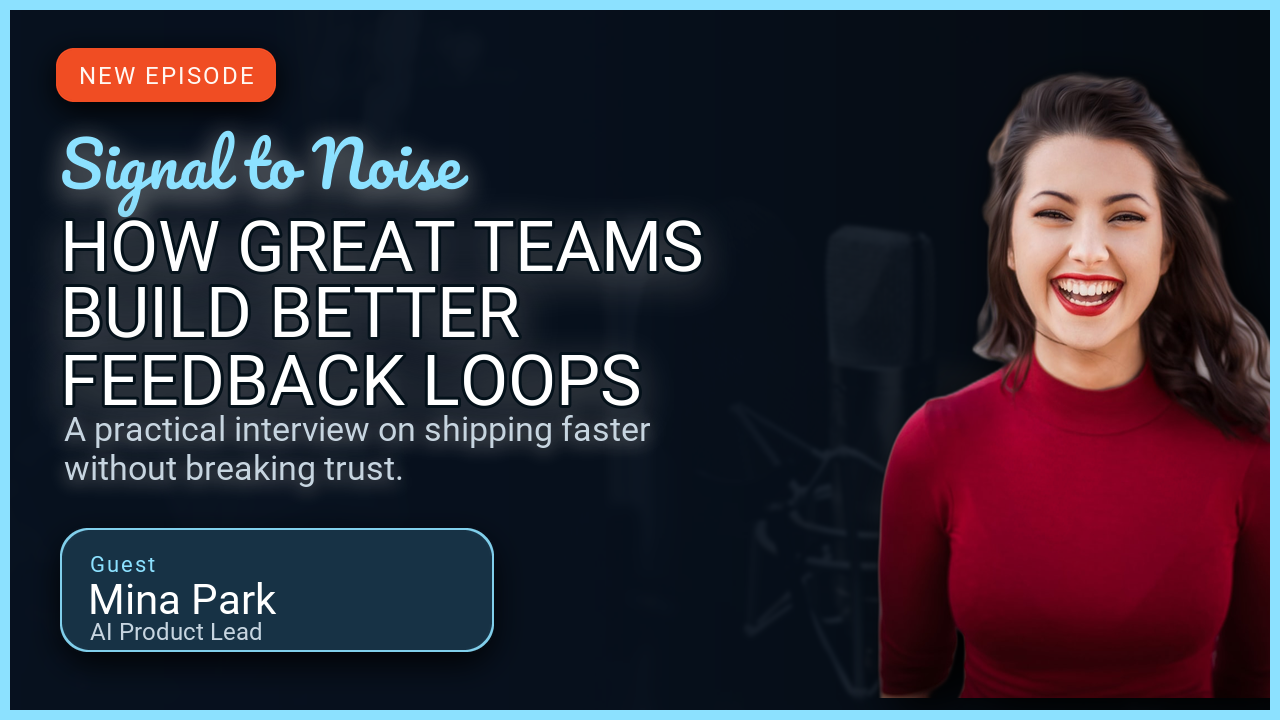
방송 이름과 에피소드 제목, 게스트 정보를 담은 카드입니다. 오른쪽은 게스트 사진으로 채웠습니다.
예제를 실행하려면 uv를 설치하고 저장소를 복제하세요.
git clone https://github.com/sjquant/quickthumb
cd quickthumb
uv run python examples/podcast_interview_promo.py
스크립트는 examples/podcast_interview_promo.png를 기록하며 같은 이름의 기존 파일을 덮어씁니다.
처음 실행할 때는 방송 제목의 웹 글꼴을 내려받기 위한 네트워크 연결이 필요합니다. 이후에는 캐시를 사용합니다.
구성 방식
- 인물 사진이 배경입니다.
.background(image=..., fit=FitMode.COVER)는 캔버스 전체를 사진으로 채웁니다. 배경 제거를 하지 않으므로 다듬어야 할 잘린 가장자리도 없습니다. - 그라디언트로 글자가 잘 보이게 합니다. 정지점 네 개를 둔
LinearGradient로 텍스트 뒤는 불투명한 검정으로, 얼굴 위는 완전히 투명하게 만듭니다. 중간 정지점을 옮기면 검정색이 사라지는 위치를 조절할 수 있습니다. - 방송 제목은 웹 글꼴을 사용합니다.
font=SHOW_FONT_URL은 Google Fonts의.ttf파일을 가리킵니다. URL은 이미 특정 스타일 파일이므로weight,bold,italic은 적용되지 않습니다. - 강조색은 하나입니다. 방송 제목 아래의 짧은 빨간 선만 유채색이고 나머지는 흰색이나 회색입니다.
코드
"""
Podcast / interview promo example.

Demonstrates:
- Local editorial portrait assets used as full-bleed backgrounds
- Webfont loading from a URL for the show title
- Tonal gradients that preserve portrait detail behind high-contrast copy
"""

import os

from quickthumb import Canvas, FitMode, LinearGradient

FILE_DIR = os.path.dirname(__file__)
ASSETS_DIR = os.path.join(FILE_DIR, "..", "assets")
OUTPUT_PATH = os.path.join(FILE_DIR, "podcast_interview_promo.png")

os.environ["QUICKTHUMB_FONT_DIR"] = os.path.join(ASSETS_DIR, "fonts")
os.environ["QUICKTHUMB_DEFAULT_FONT"] = "Roboto"

GUEST_IMAGE_PATH = os.path.join(ASSETS_DIR, "images", "podcast-guest-editorial.png")
SHOW_FONT_URL = "https://fonts.gstatic.com/s/dmserifdisplay/v17/-nFnOHM81r4j6k0gjAW3mujVU2B2K_c.ttf"

(
    Canvas(1280, 720)
    .background(
        image=GUEST_IMAGE_PATH,
        fit=FitMode.COVER,
    )
    .background(
        gradient=LinearGradient(
            angle=0,
            stops=[
                ("#000000", 0.0),
                ("#000000F7", 0.48),
                ("#00000030", 0.72),
                ("#00000000", 1.0),
            ],
        )
    )
    .text(
        content="EPISODE 06",
        size=18,
        color="#A1A1A6",
        weight=800,
        letter_spacing=3,
        position=(64, 54),
    )
    .text(
        content="Signal to Noise",
        font=SHOW_FONT_URL,
        size=50,
        color="#F5F5F7",
        position=(62, 88),
    )
    .shape(
        shape="rectangle",
        position=(64, 158),
        width=96,
        height=6,
        color="#FF453A",
    )
    .text(
        content="HOW GREAT TEAMS\nBUILD BETTER\nFEEDBACK LOOPS",
        size=68,
        color="#F5F5F7",
        weight=700,
        line_height=0.98,
        position=(58, 188),
    )
    .text(
        content="Shipping faster — without breaking trust.",
        size=27,
        color="#A1A1A6",
        position=(64, 424),
        max_width=570,
        line_height=1.25,
    )
    .shape(
        shape="rectangle",
        position=(64, 536),
        width=420,
        height=1,
        color="#FFFFFF33",
    )
    .text(
        content="GUEST",
        size=15,
        color="#A1A1A6",
        weight=700,
        letter_spacing=3,
        position=(64, 558),
    )
    .text(
        content="Mina Park",
        font=SHOW_FONT_URL,
        size=38,
        color="#F5F5F7",
        position=(62, 582),
    )
    .text(
        content="AI Product Lead",
        size=19,
        color="#86868B",
        weight=500,
        position=(66, 630),
    )
    .render(OUTPUT_PATH)
)

print(f"✓ Podcast / interview promo created: {OUTPUT_PATH}")
print("  This example requires network access only for the display webfont.")
같은 레이아웃에서 화면을 채우는 사진 대신 배경을 제거한 인물 사진을 쓰려면 웹 글꼴과 배경 제거를 참고하세요.